Knitting Pattern Design Software – create your own knits, cross-stitch projects, and more
A design program for craft patterns, made for both professionals and hobbyists! Design colorwork knits, cable patterns, cross-stitch projects, and beadwork – all within one easy-to-use application.
One site, many features!
Keep track of your knitting projects with a digital knitting journal, or make quick notes on handy virtual post-its. The journal helps you stay organized and lets you track things like your annual yarn usage.
Digital craft pattern design – private and secure
We don’t store your projects or notes on our servers. Download your work and save it to your own cloud storage so you can continue your projects anytime, anywhere, on any device. The perfect solution for crafters who value their privacy.

Adjustable grid for all craft techniques
A flexible vertical and horizontal grid (1–10 mm) suitable for various crafts: knitting, cross-stitch, and beadwork. With a maximum size of 200 x 200 squares, you can design even large projects.

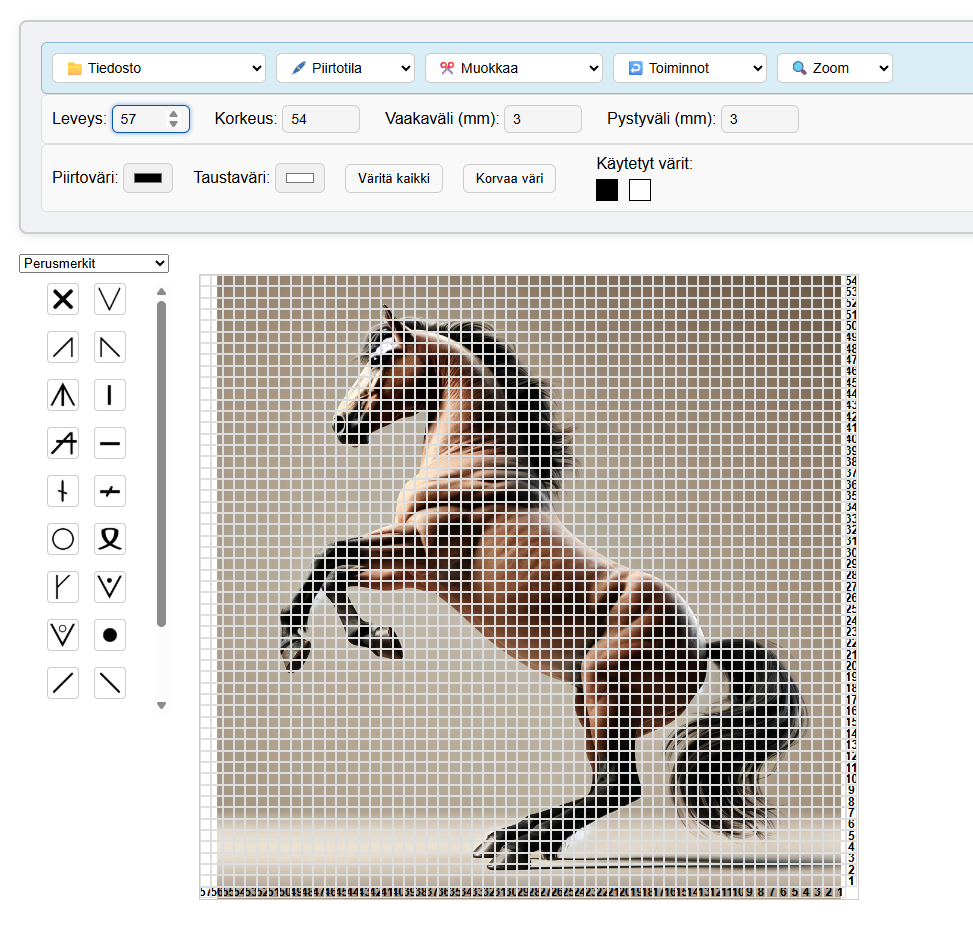
Background image tool – turn photos into craft patterns
Upload your own photo and transform it into a craft pattern. Create personal keepsakes for knits, cross-stitch, or embroidery designs. Unlimited possibilities to make exactly what you want.

Pre-made symbols and marks
A selection of ready-made knitting and chain stitch symbols, plus the option to upload your own symbols as images (max 10 per project). Perfect for all grid-based crafts.

Easy saving and continuing projects
Save projects as A4 images (.png), printable PDF instructions, or editable files (.json). Share your designs with family and friends, or keep them private in your personal archive.
Adaptive grid for different craft techniques
Adjust the grid size to fit the requirements of your craft project. The zoom function makes it easy to handle details in larger projects.
Master your color palette
Choose the perfect colors for your projects from the RGB color chart. Easily replace colors across the entire project at once. Quick colors remember the last 10 colors you used for fast access. A perfect tool for both single-color and multi-color project design.
Ready-made symbol library for crafters
Knitting symbols: no stitch, increases, decreases (k2tog, SSK, k3tog), basic stitches (knit, purl), transfers, yarn overs, and special techniques (knit front and back, k1p1k1 in same stitch).
Craft symbols: 10 most common chain stitch symbols, plus space for your own symbols.
Custom icons: upload ready-made or draw your own symbols for your projects, 10 slots per project (recommended image size: 200px × 200px).
You can add knitting symbols as images in the notes/instructions text area below the grid.
What are custom icons and how do I make them?
You can use common image file formats as icons (.png, .jpg, .gif, .svg, .webp).
You can create your own images using your operating system’s drawing program; a sufficient image size is 200 × 200 pixels (5.29 cm × 5.29 cm).
Remove the background if you want the grid’s background color to show beneath the icon. You can remove the background directly in programs like Windows Paint or via websites such as remove.bg
Turn photos into craft patterns
Use your favorite photos, digital art, or freely available images for inspiration. You can draw and color a grid pattern directly on top of an image, making it perfect for colorwork knitting, cross-stitch, and embroidery projects. Create personalized gifts or preserve memories in your crafts.
Other drawing tools
Line tool: Draw precise borders, geometric shapes, or your own designs directly onto the grid.
Area tools: Select rectangular areas or individual squares. Copy, cut, and paste pattern elements within your project, or fill the grid with a repeating pattern.
The cut-and-paste function applies to the bottom-right corner of the selection.
If no paste point is selected, the default action is to fill the grid.
Digital knitting journal and bulletin board (In english of course)
Knitting journal: Track your projects and keep plans organized. The journal calculates the number of completed projects and the yarn used based on the information you provide. Get an annual summary of your crafting progress. Customizable home page.
Bulletin board: Quick notes on post-it-style slips. Perfect for busy crafters to track projects and ideas.
100% private: All data is stored on your own device. Sync through your cloud service to edit the same file on multiple devices.
*NEW* PixelNepi
Turn your image into a knitting pattern in seconds!
Coloring a grid can be relaxing — but when you’re in a hurry or juggling a busy day, it can quickly become frustrating. That’s exactly why we created PixelNepi.
Upload an image and let PixelNepi automatically fill the entire grid for you. Transform portraits, pets, and logos into ready-to-knit patterns — so you can focus on what truly matters: refining the details and enjoying the knitting process.
Features:
● Automatic coloring of the entire grid
● Adjustable grid size (3–10 mm) — suitable even for large, and we truly mean large, designs
● From black & white to full color palettes
● Fine-tune manually, one cell at a time
● Save as PDF and print directly, or export as JSON and continue editing in Nepi
Our offline version, ”Nepi – knitting pattern design software,” is available in the KANIVA-store.
If you have any questions, you can always get in touch with us.
Do you have any questions or issues using the site? Or perhaps suggestions for improvements or requests for new knitting symbols?
We usually respond within a few hours – but always by the end of the next business day at the latest.
KANIVA
Sign up for free to try the demo. Upgrade anytime to a paid plan and enjoy easy ordering with all major cards.

© 2025 NepiKnitting